Music, 74 music – LG LGM320N X Power 2 Instrukcja Obsługi
Strona 204
Useful Apps
74
Music
You can play and manage songs or music albums.
1
Tap
LG Music.
2
Select a category.
3
Select a music file.
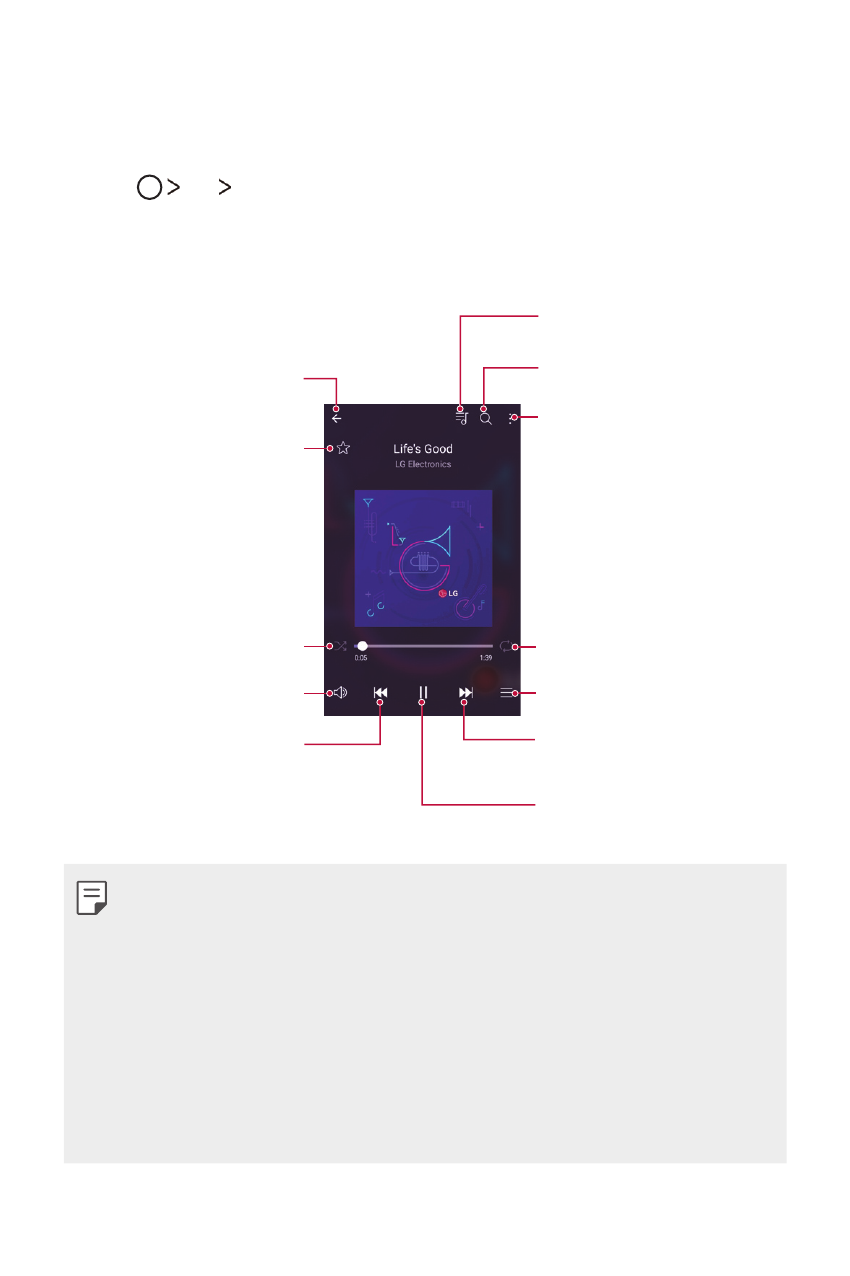
Add or delete favourites.
Back to the previous screen.
Adjust the sound volume.
Play in random order.
Tap to play from the beginning
of the current file / Double-tap
to play the previous file / Touch
and hold to rewind.
Access additional options.
Select a repeat mode.
Open the music library.
Tap to play the next file / Touch
and hold to fast forward.
Pause or play.
Switch to the playlist.
Search for music files.
•
Some file formats may not be supported, depending on the installed
software.
•
Files that exceed the size limit may cause an error.
•
Music files may be protected by international copyright owners or
copyright laws. You may have to obtain legal permission before copying
a music file. To download or copy a music file, first check the copyright
law for the relevant country.
•
This model supports Hi-Fi audio playback. Hi-Fi audio files display the
Hi-Fi icon.